
YOUR ONLINE CLOTHING PHOTO STUDIO
Flat lay clothing photos, simply arranged.
Give your garment an uncluttered overhead presentation. Start with a clear photo, choose Flat lay, and create a product image for your shop or collection.
Try 3 photos freeNo card required. See plans and credit pricing.
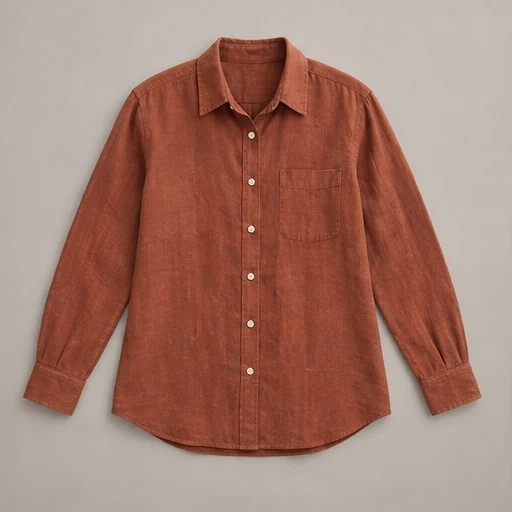
From your photo
to your shop.
Simple product listings, folded or laid-out pieces, and collections with an understated visual style.
Lay out the actual garment
Use a clean surface and natural spacing. Keep sleeves separate from the body and include the complete outline. Photograph from above as squarely as you can.
Choose a simple setting
Select Flat lay in the studio. Pick a background that gives the fabric enough contrast without competing with its print, texture or colour.
Compare before publishing
Check the layout, proportions, seams and fabric condition. Once reviewed, export the image at full size or build square and portrait social layouts.
An overhead view with a clear purpose
A flat lay lets shoppers see a garment without a model or visible display. It works well when the piece’s outline, surface and print are the main story. Start with one item when those details need close attention. A staged image should support the listing, with additional originals showing the back, label and any condition details.
Prepare fabric before taking the photo
Straighten the garment gently and arrange it as you want it seen. Keep pockets, collars and cuffs visible. Avoid using a heavily folded or partially hidden source to represent the whole piece: the AI would need to guess what is missing. Good preparation gives you a more useful original as well as a better reference for staging.
Take one reviewed photo into several layouts
Use a square for a compact product grid, a portrait for a taller composition, or a story layout for social posts. Mannequin can resize and brand an existing result without another image-generation credit. Check that the final crop still includes the garment and that added text or branding does not cover useful detail.
A few useful answers.
Do I need professional camera equipment?
A sharp phone photo can be a useful starting point. Even light, an overhead angle and an uncropped garment matter more than elaborate props.
Will the AI preserve the exact fabric colour?
Colour can shift with the source lighting and generated scene. Compare the result with your original and the physical item before using it to describe what a buyer will receive.
Is a flat lay the same as a ghost mannequin image?
No. A flat lay has a laid-out, overhead presentation. A ghost mannequin aims to show a supported garment’s form with no visible support.
Ready for your next piece?
Create an account and try three AI photos free.
Compare every result with your original before sharing.